Audit Compliance: AI Agents' Autonomous Decisions on Employee Devices
Audit compliance of AI agents' autonomous decisions on employee devices: inventory, per-action evidence, policy before execution, and framework mapping.
Agen.co
/24 min read
Audit compliance for AI agents' autonomous decisions on employee devices means being able to prove, action by action, what an agent did on a laptop, which employee it acted for, which policy allowed or stopped it, and that the record lives somewhere neither the agent nor the employee can edit. Without that record, the decision is unauditable.
That bar is new for most security, compliance and internal-audit teams. Agents on laptops act with the employee's own access, often outside any system you already log, and an auditor who asks to see the control usually gets activity logs instead of evidence that a control operated. Our guide to auditing AI systems and autonomous agents covers the full audit lifecycle. This page goes one level deeper on the hardest part of it, the laptop, and answers five questions: which agents are there, how to find them, what each record must hold, how to enforce and prove policy, and how the evidence maps to SOC 2, ISO/IEC 42001, the EU AI Act and employee privacy law.
Which AI Agents Run on Employee Devices, and Why They're Harder to Audit
Four kinds of AI agents run on employee devices today: desktop assistants, IDE and CLI coding agents, browser agents, and local Model Context Protocol (MCP) servers. They're harder to audit than server-side agents because they act with the employee's own credentials, skip the network chokepoints you already log, and keep whatever records they write on the laptop itself.
The type matters less than three questions an auditor will ask of each one: what can it reach, where do its own records end up, and what can't you see?
| Agent type | What it can reach | Where its own records live | The auditor's blind spot |
|---|---|---|---|
| Desktop assistants | Local files, other applications, and SaaS tools through the employee's signed-in sessions | App storage on the laptop or the vendor's cloud console; varies by product | Actions inside other apps look like the employee did them |
| IDE and CLI coding agents (Claude Code, Cursor, Codex CLI and similar) | The shell, the repository, package managers, and credential files in the home directory | On the laptop by default; Claude Code can export telemetry when an administrator configures it | Settings and instructions arrive with every cloned repository |
| Browser agents | Logged-in web sessions, forms, purchases and approvals | Browser or extension storage; rarely anywhere central | Server-side logs show the employee's session, not the agent inside it |
| Local MCP servers | Whatever they expose to any connected agent: files, databases, stored SaaS tokens | Standard error output, which the client may capture, forward or ignore | Often no central record that the server exists at all |
Why laptop agents break server-side audit assumptions
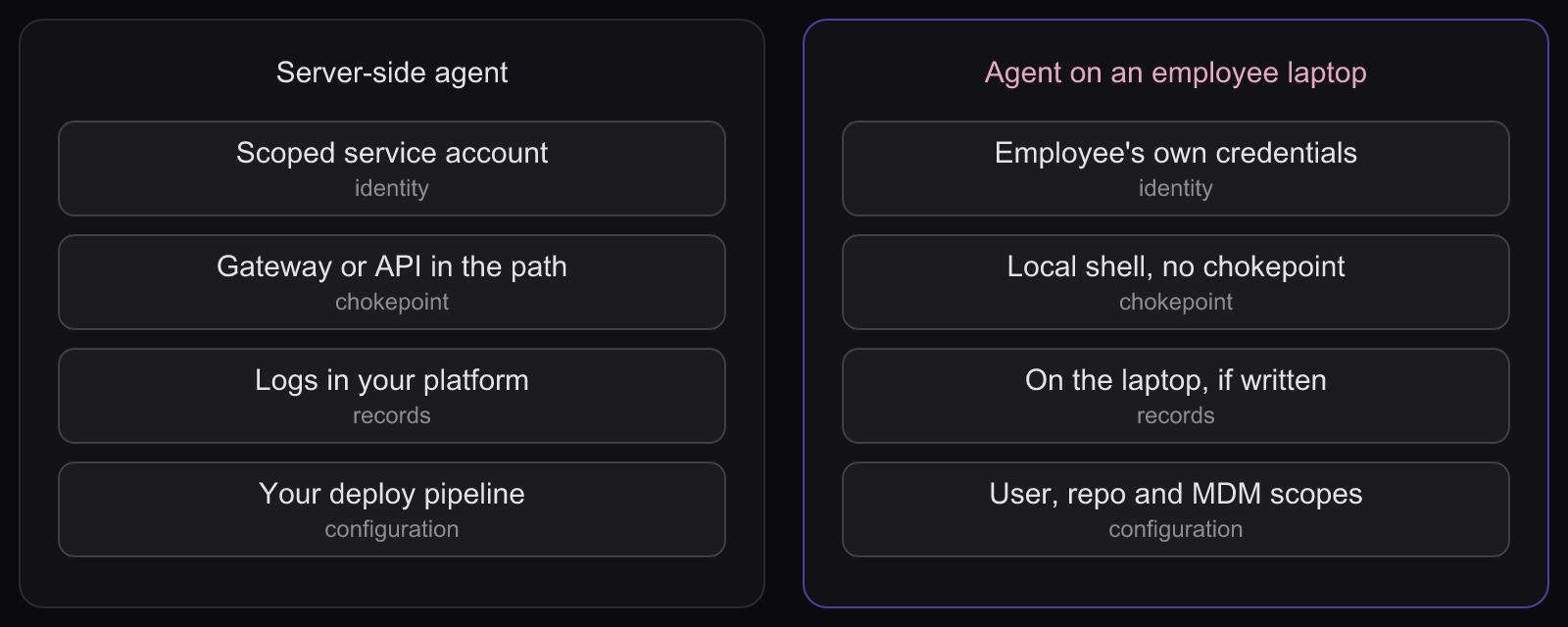
Server-side agents inherit the audit plumbing you already run. Agents on a laptop don't, for five reasons:
- Identity: the employee's credentials, not a service account. A server-side agent usually runs as a scoped service account. A coding agent on a laptop pushes with the developer's SSH key and reads the cloud credentials in their home directory, so downstream logs show one principal where there were two.
- Chokepoint: none for local actions. Server-side agents call tools through a gateway or API you can log. A shell command that deletes files or reads a token file never crosses a proxy, so only something on the device sees it.
- Records: local and optional. Server-side logs land in your platform. Under the MCP stdio transport, the client launches the server as a subprocess, and the server may write logs to standard error that the client is free to capture, forward or ignore. Nothing guarantees a record exists. Local MCP servers that use HTTP instead should bind only to localhost and validate the Origin header, which the spec asks for and not every server does.
- Configuration: several sources at once. Server-side agents get their configuration from your deploy pipeline. Claude Code, for example, merges managed, user, project and local settings, and project settings travel with every cloned repository. The same agent can behave differently on two laptops.
- Agency: more reach than the task needs. OWASP lists excessive agency (LLM06:2025) as a top risk for LLM applications: tools with more permissions, functionality or autonomy than the job requires. On a laptop, that reach is whatever the employee can do.
Local MCP servers deserve their own review, because one server can hand every connected agent the same reach. Our guide to MCP compliance for regulated industries covers how MCP servers fit sector rules such as financial-services and healthcare obligations, and which controls auditors in those sectors look for.
How to Discover and Inventory AI Agents on Employee Devices
To discover and inventory AI agents on employee devices, combine four signals: MDM inventory for what is installed, EDR telemetry for what runs, agent configuration files for how each agent is set up, and decision records for what agents actually did. No single signal is enough, so reconcile them on a schedule and treat the gaps as findings.
Mobile device management (MDM) is the channel that installs apps and configuration profiles on managed laptops. Endpoint detection and response (EDR) records process, file and network activity. Both were built for software and people rather than agents, which is why the agent-specific signals carry most of the weight.
Per-agent fingerprints to look for
Each agent leaves files and processes you can collect through MDM scripts or EDR queries. Claude Code is the best-documented example, so it anchors the table; look for the equivalent files for every other agent you allow.
| Agent or signal | Where to look | What it tells you | What it misses |
|---|---|---|---|
| Claude Code, user and project configuration | ~/.claude/settings.json; .claude/settings.json and .claude/settings.local.json in each repository; ~/.claude.json, which holds MCP server configurations | Installed, configured, and which MCP servers it can reach | Whether and how it was used |
| Claude Code, managed policy | /Library/Application Support/ClaudeCode/managed-settings.json and managed-mcp.json, or a configuration profile for the com.anthropic.claudecode domain | Whether the device receives your policy | Drift: confirm what applies with /status or claude doctor, which show the managed source in effect |
| Other coding agents and IDE extensions | Application and extension inventories from MDM; agent configuration folders in home directories | Presence and version | Configuration detail varies by product; nothing about usage |
| Local MCP servers | EDR process trees showing an agent starting a server as a child process; listeners on localhost | A server is running, and which agent launched it | What the server was asked to do |
| Browser agents and AI extensions | Managed browser extension inventories | Presence in managed browser profiles | Personal profiles and unmanaged browsers |
Admins can also restrict which MCP servers Claude Code may use to a managed list with allowManagedMcpServersOnly, which turns the MCP inventory from a discovery exercise into an allowlist you maintain.
What each signal can and cannot see
Plot the four signals on two questions: does it know which agent acted and how it was configured, and does it see what the agent did?
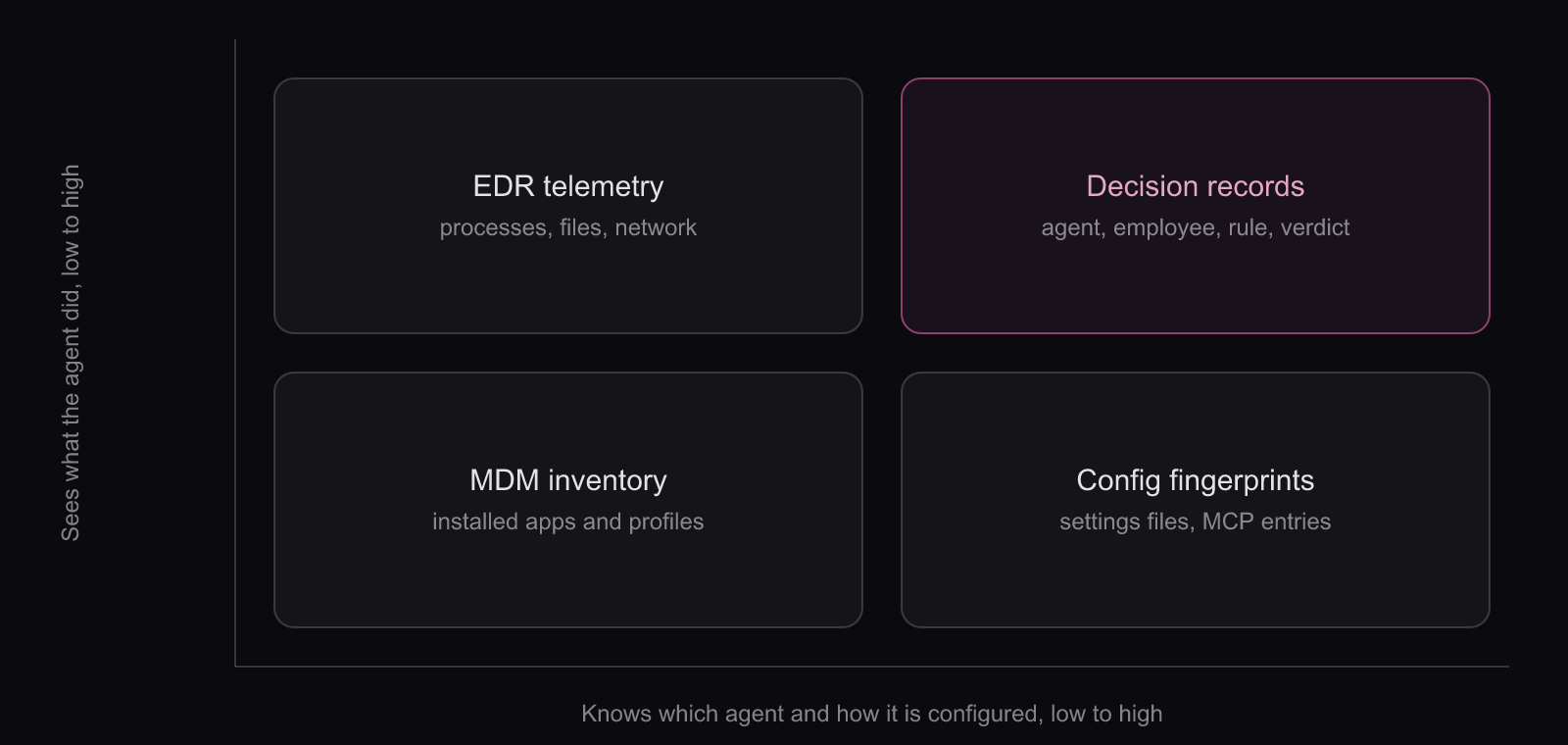
- MDM inventory - installed apps and profiles. Weak on agent configuration, blind to actions.
- EDR telemetry - processes, files and network connections. Sees actions, but not which agent acted for whom or under which rule.
- Configuration fingerprints - settings files and MCP entries. Strong on configuration, silent on actions.
- Decision records - agent, employee, rule and verdict per action. The only signal strong on both, and only for agents on a governed path.
A minimal inventory record
Keep one row per agent per device, with enough to assign an owner and spot drift:
- Device identifier and the employee it is assigned to
- Agent, version and install source (MDM, self-installed, IDE marketplace)
- Configuration sources in effect (managed, user, project) and the policy version applied
- MCP servers configured, with name, transport and scope
- Sanctioned status and business owner
- First seen, last seen, and last decision record received
Reconcile, then chase the shadow
Compare the signals against each other on a schedule. An agent that shows up in configuration fingerprints but sends no decision records is running off the governed path. A device that sends decision records but has dropped out of MDM may be enforcing stale policy. Each mismatch is a finding with an owner and a due date.
Watch for personal accounts, too. An employee signed into a personal subscription of a sanctioned agent looks sanctioned in the app inventory. Telemetry that carries an organization identifier, as Claude Code's does, helps separate work use from personal use. For discovery beyond the laptop, our guide to shadow AI covers network and SaaS signals and how to move unsanctioned tools onto a governed path instead of simply banning them.
How to Capture a Per-Action AI Agent Audit Trail That Leaves the Endpoint
A usable AI agent audit trail on the endpoint has one record per action, written by something other than the agent, attributed to the agent and the accountable employee, and shipped to a store off the laptop. Each record carries the policy verdict and the rule behind it, so an auditor can test the control instead of reading activity.
The general fields every AI audit trail needs are covered in our AI audit guide. On a laptop, the record has to travel further and survive more, so the flow below is the shape every design should follow, whoever builds it.
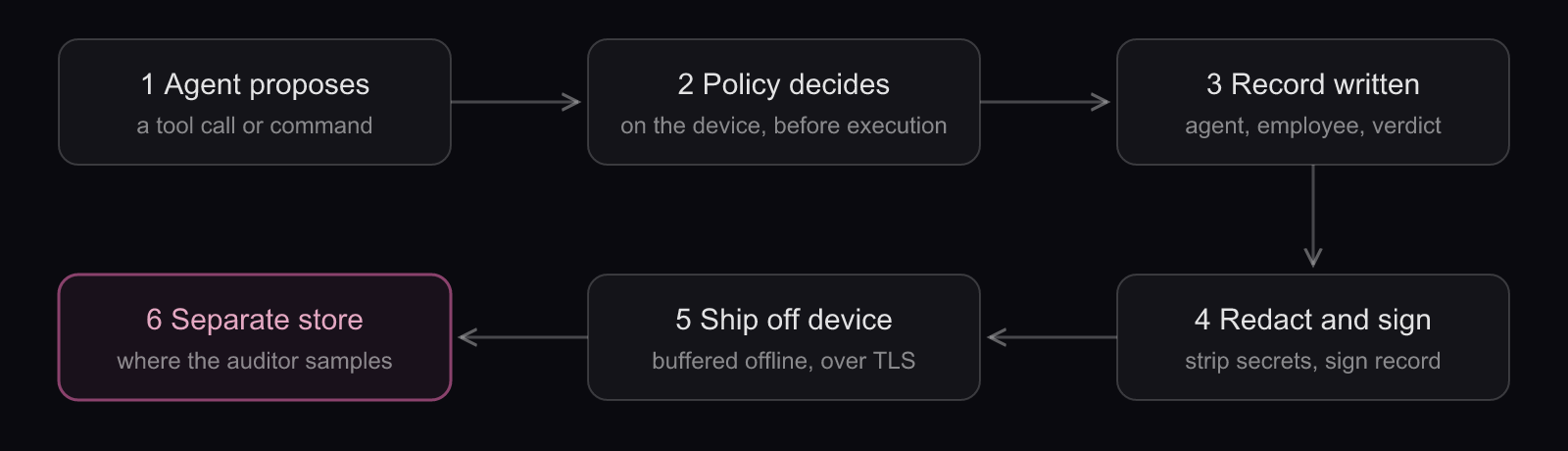
- The agent proposes an action: a tool call, a shell command or a file read.
- A policy check on the device decides, before anything executes.
- A record is written naming the agent, the employee and the verdict, plus the rule that produced it.
- Secrets are stripped, sensitive content is redacted or hashed, and the record is signed.
- The record ships off the device over an encrypted connection, buffered while the laptop is offline.
- It lands in a separate store, which is where the auditor samples.
The endpoint record, field by field
The fields below are the ones a laptop adds or changes. Device, decision source, policy version, sequence number and receipt time are what turn an activity log into evidence an auditor can test.
| Field | What it answers for the auditor | Endpoint-specific note |
|---|---|---|
| Agent and session | Which agent acted, in which run | Agent name, version and session identifier |
| Accountable employee | Who the agent acted for | A directory identity, not a local username |
| Device | Where it happened | Managed device identifier and health at decision time |
| Action | What was attempted | Tool, command or file path, and target; redacted or hashed where your privacy assessment requires |
| Verdict | What the control decided | Allow, flag, block or escalate |
| Decision source and rule | Why | Rule identifier, policy version, and whether a managed rule, a hook or a person decided |
| Approver | Who signed off an escalation | Named human and time of approval |
| Outcome | What happened next | Success or failure, and duration |
| Time and sequence | When, and whether anything is missing | Device time, server receipt time, and a per-device sequence number |
| Integrity | Whether the record was altered | Signature created on the device and verified on receipt |
Attribution to both parties is an identity problem before it is a logging problem. The agent needs an identity of its own, distinct from the employee's, and the record needs a verifiable link from that identity to the person it acted for. Our guide to non-human identity explains how agent identities are issued, scoped and retired alongside service accounts and workloads.
What one agent's telemetry gives you, and where it stops
Some agents already emit useful events. Claude Code can export OpenTelemetry data: a claude_code.tool_decision event records whether a tool call was accepted or rejected and whether configuration, a hook or the user made that call, and a claude_code.tool_result event records the tool, success, duration and MCP server scope. Events carry session, user, email and organization identifiers. An administrator can set the export endpoint in managed settings, and repository-level OpenTelemetry variables are ignored.
Anthropic's documentation includes two caveats that matter for audit. A developer can still disable a signal unless the exporter itself is set in managed settings, and the docs don't state that managed settings can force the content switches off.
That's good evidence from one vendor's agent. It isn't a fleet audit trail: it covers one tool, its verdicts come from settings you have to lock down separately, and it says nothing about the other agents on the same laptop.
Privacy by design: record the action, not the person
Agent records are employee data. They name a person, and commands and file paths can reveal what that person is working on. Design for that from the first field:
- Keep content out by default. Claude Code's telemetry shows the right default: prompt text is exported only when
OTEL_LOG_USER_PROMPTS=1is set, and tool inputs such as commands only withOTEL_LOG_TOOL_DETAILS=1. - Record the decision, not the session. Verdict, rule and target usually suffice. Keystrokes, screens and browsing history have no place in an agent audit trail.
- Hash or redact paths and arguments likely to hold personal or secret data, keeping a hash where you need to correlate events.
- Gate raw access to a small group, and log every read of the records themselves.
- Write the purpose down: security and audit. Reusing the records for performance management changes the purpose and needs its own assessment, covered in the framework section below.
Offline laptops and clock drift
Laptops sleep, travel and lose connectivity. The evidence has to survive that:
- Keep enforcing offline. A control that fails open when the network drops isn't a control.
- Buffer and upload. Queue records locally and send them on reconnect. Ask any vendor whether decisions made offline are queued, and test the answer.
- Number every record per device, so the store sees a gap rather than silently missing one.
- Keep two clocks. Record device time and receipt time, and flag records whose clocks disagree beyond a threshold you set.
Integrity an auditor can verify
Describe integrity in terms an auditor can check, not adjectives:
- Sign on the device, verify on receipt. A record that fails verification is itself a finding.
- Store it where the laptop can't reach. The employee, the agent and the device's admin account should have no write or delete rights in the log store. Restrict deletion in the store itself and log its use.
- Consider hash chaining. An active IETF Internet-Draft proposes hash-chained agent audit records, so that a deleted or edited record breaks the chain. It is a draft, not a standard, but the pattern is sound.
- Follow established log management. NIST SP 800-92 covers how security logs are generated, transmitted, stored and protected, and the same practices apply to agent records.
- Set retention deliberately. Long enough for your audit period and legal duties, short enough to respect minimisation. The framework section below covers both pulls.
How to Enforce Policy Before an Agent Acts, and Prove It
Enforcing policy before execution means checking each proposed agent action against your rules on the device and allowing, flagging, blocking or escalating it before it runs. You prove it with the records the check leaves behind: every verdict, including every block, names the rule that fired, so an auditor can replay a denied action and find its record.
Why a log of activity isn't evidence of a control
An activity log tells you an agent deleted a directory. It doesn't tell you a control existed, whether it fired, or whether the deletion was in policy. Auditors test controls, and a SOC 2 Type II report covers whether controls operated effectively over a period. That makes the block record, the evidence of an action that never happened, some of the strongest material you can hand over. To maintain auditability and compliance for AI autonomous decisions, the denial has to be as visible as the success.
Four verdicts and what each one proves
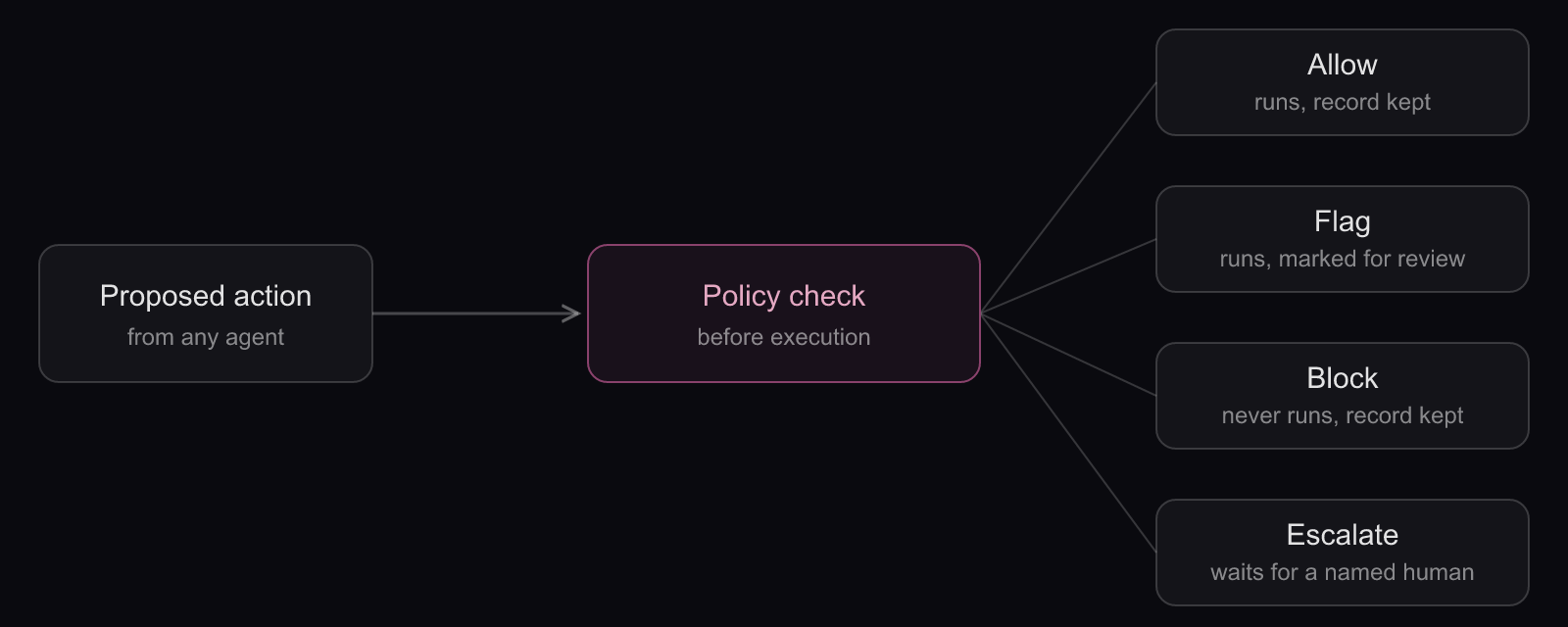
| Verdict | What happens | What it proves to an auditor |
|---|---|---|
| Allow | The action runs and a record is kept | The action matched policy, under a named rule and version, at that moment |
| Flag | The action runs and is marked for review | Detection works and someone follows up; the review notes become evidence too |
| Block | The action never runs and a record is kept | The preventive control operated |
| Escalate | The action waits for a named human to approve or deny it | Human oversight happened, with the approver and the time on record |
Escalation design is a topic of its own. Our guide to human-in-the-loop AI covers which agent actions should stop and ask, and how to keep approvals from turning into rubber stamps.
Proving who made the decision
Every record should say what decided: a managed rule, a local rule, a hook, or a person clicking approve. Claude Code shows the pattern. Its tool_decision event carries a source field that separates configuration, hooks and user decisions, and a rejected call appears as a decision event rather than a tool result. Its managed settings can make managed policy the only source of permission rules and hooks (allowManagedPermissionRulesOnly, allowManagedHooksOnly), which removes the question of whether a developer's local rule let the action through.
Anthropic's docs also note that a user with local administrator rights can edit the managed settings file. Redeploy it through MDM on a schedule and alert on drift, so the policy version stamped on each record is one you can stand behind.
Start in observation, then enforce
Blocking on day one breaks builds and teaches developers to route around the control. Run observe-only first to baseline what agents actually do, write rules from that baseline, flag before you block, and record every policy change with who approved it. The change history is evidence too: it shows the control was designed, reviewed and tuned, not switched on once and forgotten.
Limits to state in the control description
- Local administrators can usually modify or remove endpoint software. Detect it through health reporting and missing check-ins; don't claim it can't happen.
- Coverage ends at the agents and operating systems your tooling supports. List the gaps by name.
- Rules can be wrong in both directions. Track false positives and exceptions with owners and expiry dates.
- Personal devices and personal accounts sit outside the control unless policy brings them in.
An auditor trusts a control that states its limits more than one that claims to have none.
How SOC 2, ISO/IEC 42001, the EU AI Act and Employee Privacy Law Map to Endpoint Agent Evidence
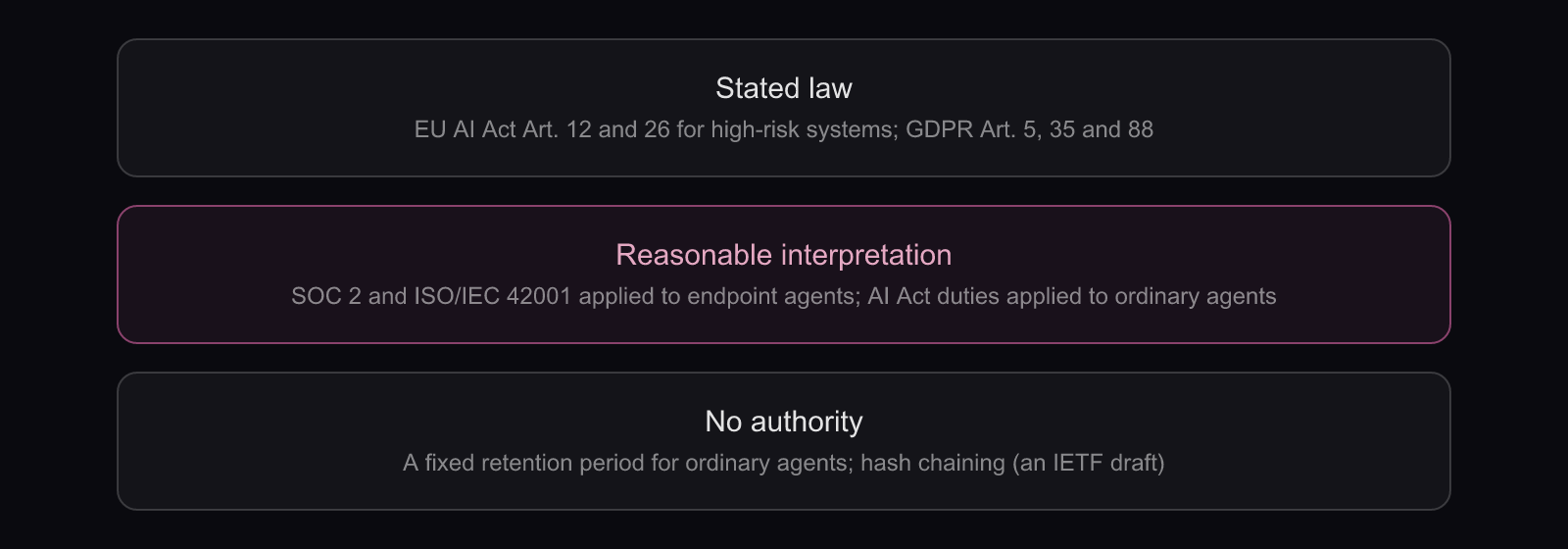
None of these frameworks names AI agents on employee laptops. SOC 2 and ISO/IEC 42001 reach them through reasonable interpretation, the EU AI Act's logging duties attach only where the agent use is a high-risk AI system, and privacy law constrains what you may log about employees. Label each mapping honestly: stated law, reasonable interpretation, or no authority.
The table sorts AI agent compliance evidence by how firmly each source asks for it. Put the same label in your control narrative; auditors and regulators respond better to an honest "this is our interpretation" than to a claim of coverage the text doesn't support.
| Source | What it asks of endpoint agent evidence | Status |
|---|---|---|
| EU AI Act, Article 12 | Automatic recording of events over the system's lifetime, to support traceability | Stated law for high-risk AI systems. Applying it to an ordinary coding agent: reasonable interpretation |
| EU AI Act, Article 26(6) | Deployers keep the logs under their control for at least six months, unless other law provides otherwise | Stated law for deployers of high-risk systems. As a default for every agent: no authority |
| EU AI Act, Article 26(7) | Employers inform workers' representatives and affected workers before using a high-risk AI system at the workplace | Stated law for high-risk systems; good practice for any agent whose records name employees |
| SOC 2 Trust Services Criteria | Evidence that logical access and monitoring controls operated across the report period | Reasonable interpretation: the criteria don't name agents |
| ISO/IEC 42001 | Documented, operating controls over the AI systems in your management system | Reasonable interpretation: it is a management-system standard, so the endpoint evidence is yours to define |
| GDPR, Article 5 | Collect only what the purpose needs and keep it no longer than needed | Stated law; how much agent content to keep is a judgment you document |
| GDPR, Article 35 | A data protection impact assessment where processing is likely to result in a high risk | Stated law; whether agent logging triggers it: reasonable interpretation (often yes) |
| GDPR, Article 88 and national law | Member-state rules for employee data, including monitoring systems at work; works council rights | Stated law, varying by country |
| Hash-chained agent records | Tamper evidence through chained hashes | No authority: an active IETF Internet-Draft, not a standard |
Where the EU AI Act actually attaches
The Act's logging duties attach to high-risk AI systems. Article 12 requires those systems to technically allow the automatic recording of events over their lifetime, and Article 26 puts log retention and worker-information duties on the deployers who use them. A coding agent on a developer's laptop is usually not a high-risk system in its own right, so applying these articles to it is a reasonable interpretation, borrowed as good practice, not stated law.
The line can move. Annex III lists employment uses, including AI systems used to monitor and evaluate the performance and behaviour of workers. If you start using agent decision records to judge individual employees, that use deserves its own legal review, because it sits much closer to Annex III territory than security logging does. That is an interpretation; take it to counsel.
Timing matters for planning. The Act's transparency duties under Article 50 have applied since 2 August 2026, and the obligations for the high-risk systems listed in Annex III are scheduled to apply from 2 December 2027. Our EU AI Act compliance guide covers risk classification, deployer duties and the full timeline in one place.
SOC 2 and ISO/IEC 42001: evidence that controls kept operating
SOC 2 reports are attestations by independent CPA firms against the AICPA's Trust Services Criteria. The criteria don't name AI agents, but agents acting with employee credentials sit inside the logical access and monitoring expectations, and a Type II period means you need records across the whole window, not a snapshot. Expect sampling of inventory completeness, block and escalation records, policy change approvals, and access to the log store. The AICPA has published proposed 2027 updates to the SOC 2 criteria for comment and has announced an engagement that pairs a SOC 2 report with an AI agent certification, so check the final criteria before you lock this mapping.
ISO/IEC 42001 is a certifiable AI management system standard. It asks you to run AI under documented, operating controls, but it doesn't prescribe endpoint log formats, so the evidence design is yours to define and justify. NIST publishes a crosswalk between its AI Risk Management Framework and ISO/IEC 42001 if you need to align the two. Our ISO/IEC 42001 explainer covers what the standard is, who it applies to, and how it relates to other AI frameworks.
Once the records exist, an AI compliance platform can map them to controls across frameworks and collect them continuously instead of in a scramble before each audit.
Employee privacy limits the evidence itself
Every record that names an employee is personal data, and in most deployments the employer is the controller for it. That shapes the design:
- Purpose and lawful basis. Write down why you log agent activity (security and audit) and stay inside that purpose.
- A DPIA. GDPR Article 35 requires a data protection impact assessment (DPIA) where processing is likely to result in a high risk, and systematic monitoring of employees commonly qualifies.
- Minimisation and storage limitation. Article 5 limits what you collect and how long you keep it, which is the counterweight to long retention.
- National rules and works councils. Article 88 lets member states set more specific rules for employee data, including monitoring systems at work. In several countries, works councils have consultation or approval rights over technical systems that can monitor employees, and the rules vary, so involve the works council and employment counsel before rollout.
- Transparency and proportionality. The Article 29 Working Party's Opinion 2/2017 on data processing at work stresses proportionality and telling employees what is monitored. In the UK, the ICO's guidance on monitoring workers is the regulator's reference point; the ICO notes the guidance is under review.
The practical rule: log the agent's actions, not the employee's behaviour. If the records start serving performance management, you've changed the purpose, and the assessment has to change with it. Our AI governance guide covers the wider policy program these privacy decisions belong to, from acceptable-use rules to risk ownership.
A Test Plan for Auditing AI Agent Actions on Laptops
Auditing AI agent actions on laptops comes down to tests an auditor can reproduce on sampled devices: reconcile the inventory, trigger a denied action and trace its record, delete or alter the local log, take the laptop offline, loosen a local setting, and resolve a record to a named employee. Each test either produces evidence or exposes a gap.
| Test | How to run it | Pass condition |
|---|---|---|
| 1. Inventory completeness | Pick a sample of laptops and compare on-device fingerprints with the inventory | Every agent and MCP server found is in the inventory with an owner |
| 2. Denied action | Attempt an action policy forbids, such as reading a credentials file outside the project | The action never runs, and a record with the rule identifier reaches the off-device store |
| 3. Local log tampering | Delete or edit any log kept on the laptop | The off-device copy is unchanged, and the gap or mismatch is flagged |
| 4. Offline operation | Disconnect, run allowed and denied actions, then reconnect | Policy held offline, and records arrive with unbroken sequence numbers or a flagged gap |
| 5. Local policy override | Edit a user or project settings file to loosen a rule | Managed policy still wins, and the drift is recorded or alerted |
| 6. Attribution | Pick records at random from the store | Each resolves to a named employee and a distinct agent identity |
| 7. Privacy controls | Inspect stored records and the store's access log | Content is redacted as the DPIA requires, and reads of raw records are logged |
Run the set at the start of the audit period and again before it closes. The second run is what shows the control kept operating, which is the question a Type II auditor actually asks.
Where AgenShield Fits in an Endpoint Audit Program
AgenShield enforces your agent policy on the Mac: it allows, flags or blocks out-of-policy actions before they execute, and it writes a per-decision record naming the agent, the user, the command or path, the rule and the verdict. It covers the enforcement and evidence capture steps above; retention, legal mapping and privacy assessment remain yours to build.
Here is what AgenShield does today, stated as plainly as the rest of this guide:
- Decides before execution, on the device. Out-of-policy actions, such as an
rm -rfoutside the project or a read of~/.npmrc, are allowed, flagged or blocked before they run, with no gateway or proxy in the path. A blocked action fails like a normal permission error. - Records every decision. Each record names the agent, the user, the command or path, the rule and the verdict, alongside device health. Secrets are stripped on the Mac before anything is sent, and records are signed and sent over TLS to the Agen.co console.
- Rolls out through the MDM you already run: Jamf, Kandji, Mosyle, JumpCloud, Intune, or any MDM that can push a profile and root scripts. It is generally available on macOS 14 and later on Apple silicon.
- Starts in monitor mode. Monitor, audit and enforce modes let you baseline what agents do before any rule blocks anything, which is the observe-then-enforce sequence described above.
- Covers the agents developers use: Claude Code, Cursor, Codex CLI, Gemini CLI, GitHub Copilot, Windsurf and more. For Claude Code it can also apply managed settings (deny, ask, allow) inside the agent.
- Holds when the laptop doesn't cooperate. Rules keep enforcing offline, developers can't loosen policy from a local file, and each Mac reports its health and last policy sync. A local administrator can still uninstall it with the admin password or use its emergency switch, so reviewing health reports belongs in your control.
- Reviews what arrives with a repo. Risky skills from cloned repositories wait for review, and a denied skill is blocked across the fleet.
- Stays narrow on privacy. It never observes the user's own programs, documents, browsing, keystrokes or screen. Skill, plugin and instruction file contents are sent to the console for review, and no other file contents. Network inspection is off by default; if you turn it on, it can record agent request content, so include that in your DPIA.
What stays yours to build or confirm:
- Storage and retention. Records go to the console; ask about retention and residency. If your program needs write-once storage or a fixed retention period, confirm what is provided and build the rest in your own log platform.
- Offline uploads. Enforcement continues offline. Confirm how decisions made offline reach the console before you rely on them for test 4.
- Other platforms. AgenShield is macOS only, so Windows and Linux laptops need another control, named in your control description.
- The legal work. Framework mapping, the DPIA and works council consultation are decisions for your compliance team and counsel.
For AI tools in the browser, BrowserShield is in early access with design partners only and is not generally available. It blocks unapproved AI tools and sensitive pastes into AI tools, and it collects metadata rather than prompt content. The Shield endpoint and browser protection overview shows how the two fit together.
On-device enforcement is one part of the accountability layer: identity, authorization and audit for every agent, wherever it runs. Our AI agent architecture guide shows where that layer sits relative to models, tools and gateways.
Autonomous decisions on laptops are auditable when the record is written before the action, names both the agent and the employee, and leaves the device. If you want to see what that looks like on your own fleet, run AgenShield in monitor mode on a pilot group of Macs and review the decision records with your auditor before you switch on enforcement.
Frequently Asked Questions
These answers cover the questions security, compliance and internal-audit teams ask most often when AI agents start making autonomous decisions on employee laptops: what to record, which frameworks apply, how employee privacy limits logging, and what happens when a device goes offline. Each answer stands on its own; the sections above carry the detail.
What should an AI agent audit record on an employee device include?
Each record should name the agent and its session, the accountable employee as a directory identity, the device, the action attempted, the verdict, the rule and policy version that produced it, the outcome, and timing with a per-device sequence number. Add a signature so the store can detect altered records, and redact content your privacy assessment rules out.
Does SOC 2 cover AI agents running on employee laptops?
The SOC 2 criteria don't address AI agents specifically, so coverage is a reasonable interpretation rather than a stated rule. Agents acting with employee credentials fall under the logical access and monitoring expectations in the Trust Services Criteria. Type II reports test operation over a period, so auditors typically sample inventory completeness, block records and policy change history.
Do we need a DPIA before logging AI agent activity on work devices?
Often, yes. GDPR Article 35 requires a data protection impact assessment where processing is likely to result in a high risk, and systematic monitoring of employees is a common trigger. Agent records name the employee and can reveal how they work, so plan on a DPIA in the EU and UK and record your reasoning.
Should we log the prompts and commands AI agents use?
Log commands and file paths when your policy decisions depend on them, but redact or hash anything likely to hold personal or secret data, and gate raw access. Prompts are rarely needed for audit. Claude Code, for example, leaves prompt and tool-detail content out of its telemetry unless it is explicitly enabled, which is a sensible default.
Do works councils have to approve AI agent logging?
In several EU countries, national law gives works councils a say over technical systems that can monitor employees, and agent decision records can qualify. Rules vary by country, so involve the works council and employment counsel before rollout. For high-risk AI systems, the EU AI Act separately requires informing workers' representatives before workplace use.
What happens to the audit trail when a laptop is offline?
A sound design keeps enforcing policy offline, buffers records on the device, and uploads them on reconnect with per-device sequence numbers so gaps are visible. Record both device time and receipt time to catch clock drift. Test it: disconnect a sample laptop, run allowed and denied actions, reconnect, and confirm every record arrives.
How do you maintain auditability and compliance for AI autonomous decisions?
Maintain auditability and compliance for AI autonomous decisions by keeping three things true over time: every agent is inventoried, every action passes a policy check that leaves a signed record naming agent, employee, rule and verdict, and those records live off the device. Then retest the controls each audit period, because configuration drift is a common failure.
Does EDR already give auditors what they need?
No. Endpoint detection and response tools record processes, files and network connections, which helps discovery and investigations. They typically don't record which agent acted for which employee, which policy applied, or whether an action was allowed, blocked or escalated. Use EDR as a corroborating source and inventory signal, not as the decision record auditors test.
How long should AI agent logs be kept?
No single rule covers every agent. Deployers of high-risk AI systems under the EU AI Act must keep logs for at least six months unless other law says otherwise. For other agents, set retention to cover your audit period and legal duties, then delete, because GDPR's storage limitation principle applies to records that name employees.
Keep reading
More from AI Compliance & Audit
AI Compliance & Audit
ISO/IEC 42001: The AI Management System Standard, Explained
ISO/IEC 42001 is the certifiable standard for an AI management system. What clauses 4-10 and the 38 Annex A controls require, and how certification works.
Agen.co·
AI Compliance & Audit