MCPGuide
MCP Security Risks: The Complete Enterprise Guide for 2026
Explore the top 10 MCP security risks threatening AI agent deployments, aligned with the OWASP MCP Top 10, plus proven mitigations and an enterprise checklist.

Keon ArminDigital Marketing Manager
/22 min read

MCP Security Risks: The Complete Enterprise Guide for 2026
Every MCP server you connect to your AI agents is a door. Some lead to productivity. Others lead to data exfiltration, credential theft, and unauthorized access to production systems.
The Model Context Protocol has become the standard integration layer for connecting AI agents to enterprise tools and data. Major platforms including Claude, GitHub Copilot, Cursor, and enterprise agent frameworks support MCP natively, and that adoption is accelerating fast. But the security risks of MCP are growing just as quickly, and most organizations are deploying MCP servers without fully understanding the attack surface they are creating.
This guide breaks down the specific MCP security risks that matter for enterprise teams, maps each to the OWASP MCP Top 10 taxonomy, explains where the protocol is vulnerable, and provides actionable mitigation strategies for each. For a broader look at MCP security controls and best practices, see our complete enterprise guide. If you are a security leader, platform engineer, or architect evaluating MCP for production use, this is the risk landscape you need to understand before your agents go live.
What Is MCP and Why Does Security Matter?
MCP security risks are the vulnerabilities that emerge when AI agents connect to external tools through the Model Context Protocol: prompt injection, tool poisoning, over-permissioned access, supply chain compromise, credential theft, and more. They matter because MCP servers are executable code that hold live credentials and act on production systems, so a single compromise can cascade across every tool an agent touches.
The Model Context Protocol (MCP) is an open standard created by Anthropic that defines how AI agents connect to external tools and data sources. Instead of building custom integrations for every service an agent needs to access, MCP provides a universal interface. One protocol, any tool. For the full protocol breakdown, see our guide to the Model Context Protocol.
An MCP server is a lightweight program that exposes specific capabilities to AI agents. Those capabilities could be querying a database, searching Jira tickets, sending Slack messages, or modifying records in a CRM. When an AI agent needs to perform an action, it calls a tool through MCP, and the server executes it.
The security question is straightforward: when AI agents can execute real actions on production systems through MCP, what happens when something goes wrong?
The answer depends on the risk. A misconfigured MCP server can expose sensitive data. A malicious one can exfiltrate credentials. A compromised one can give attackers access to every downstream system it connects to. And because MCP servers are executable code that hold authentication tokens, the blast radius of a single compromise can extend across your entire tool chain.
Understanding these MCP vulnerabilities is not optional for enterprise teams. It is the prerequisite for deploying MCP safely.
How MCP Works (And Where It Breaks)
MCP Client-Server Architecture
MCP uses a client-server architecture with four key components:
- MCP Hosts are the applications where the AI model runs, such as Claude Desktop, an IDE assistant, or a custom agent framework.
- MCP Clients live inside the host and manage connections to one or more MCP servers. Each client maintains a 1:1 session with a specific server.
- MCP Servers expose tools, resources, and prompts through the standardized protocol. They bridge the gap between the AI agent and external systems.
- Tools are the actual capabilities exposed by servers, such as "query a Postgres database" or "create a GitHub issue."
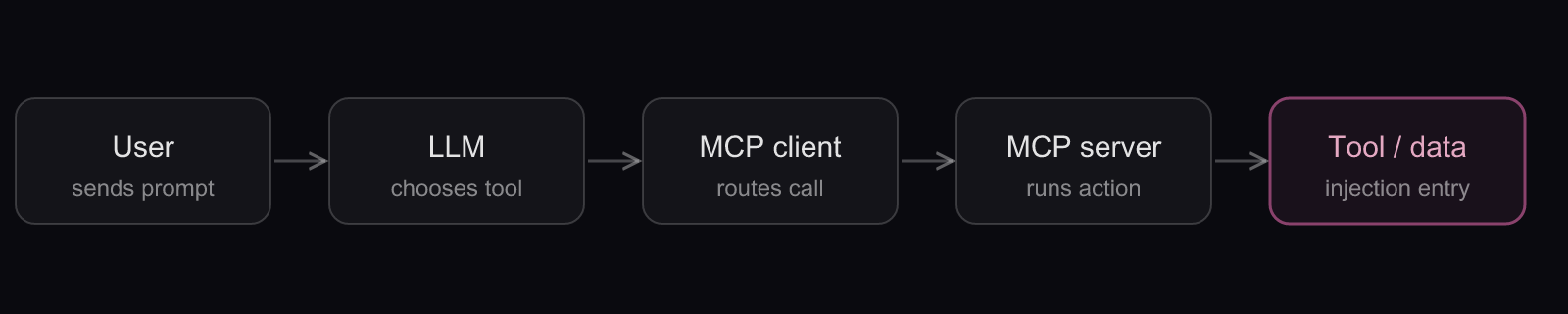
The interaction flow works like this: a user sends a prompt to the AI host. The host's MCP client packages the prompt along with descriptions of available tools and sends everything to the LLM. The model decides which tool to call and with what parameters. The client routes the call to the correct server, which executes the action and returns results. The LLM processes those results and responds to the user. Every hop in that chain is a place trust can be abused, and the final hop into external tools and data is where most injection attacks enter.
Local vs. Remote MCP Servers
Local MCP servers run on the user's machine, typically started via a command like npx or uvx and connected through standard I/O (stdio). They have direct access to the local filesystem, environment variables, and running processes. A compromised local server can execute arbitrary commands with the user's own privileges.
Remote MCP servers run as hosted services accessed over HTTP with Streamable HTTP transport. They do not have direct local access, but they hold authentication tokens for the services they connect to. A compromised remote server becomes a proxy for every system those tokens authorize.
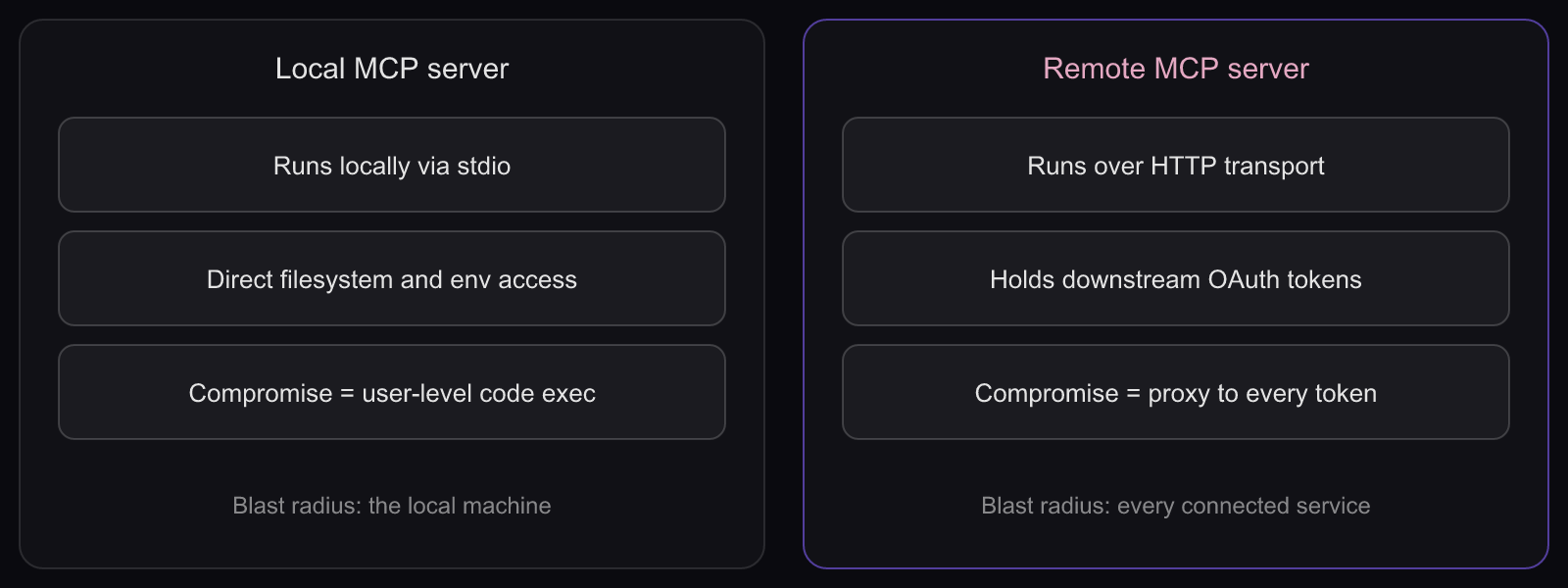
The table below summarizes how the two deployment models differ in attack surface:
| Property | Local MCP server | Remote MCP server |
|---|---|---|
| Transport | stdio (local process) | HTTP (Streamable HTTP) |
| Access | Filesystem, env vars, processes | Downstream service tokens |
| Primary threat | Arbitrary command execution | Token theft and proxying |
| Blast radius | The user's machine | Every service the tokens authorize |
Where Security Gaps Emerge
The trust chain in MCP runs from the user through the LLM, client, server, and finally to the tools and data. Security can break at any point:
- At the LLM layer: the model can be manipulated through prompt injection to call tools it should not or pass malicious parameters.
- At the client layer: clients may trust servers without verifying integrity, follow redirects to malicious endpoints, or leak session IDs.
- At the server layer: servers may request excessive permissions, hold long-lived credentials, or execute unvalidated commands.
- At the tool layer: tool descriptions can contain hidden instructions. Tool behavior can change after approval. Tool parameters can be exploited for injection attacks.
Every link in this chain is a potential attack surface. And because MCP interactions are non-deterministic, where the LLM decides what to call based on natural language input, the attack surface shifts with every prompt.
The Top 10 MCP Security Risks
Security researchers, the OWASP GenAI Security Project, the MCP specification authors, and enterprise security teams have identified a growing catalog of MCP-specific vulnerabilities. The community has since consolidated them into the OWASP MCP Top 10 (MCP01 through MCP10:2025), a taxonomy with its own ten categories, from Token Mismanagement to Shadow MCP Servers, that now sits alongside the broader OWASP Top 10 for LLM. The practitioner risks below align with that taxonomy, and the final column maps each to its closest OWASP MCP category.
Start with the at-a-glance view, then read the deep dives beneath it. Each risk lists its attack vector, its blast radius, the primary mitigation, and its OWASP MCP Top 10 identifier.
| # | Risk | Attack vector | Blast radius | Primary mitigation | OWASP MCP Top 10 |
|---|---|---|---|---|---|
| 1 | Prompt Injection | Hidden instructions in consumed content | Agent executes attacker actions via real tools | Input/output validation, guardrails, tool scoping | MCP06:2025 Intent Flow Subversion |
| 2 | Tool Poisoning | Malicious instructions in tool metadata | Model steered to attacker-chosen actions | Metadata validation, gateway inspection, trusted registry | MCP03:2025 Tool Poisoning |
| 3 | Privilege Abuse | Over-permissioned server scopes | Attacker inherits every scope the server holds | Least privilege per tool, progressive scopes, consent | MCP02:2025 Privilege Escalation |
| 4 | Tool Shadowing / Shadow MCP | Rogue or unvetted look-alike tools | Calls routed to attacker-controlled servers | Central registry, allowlisting, continuous discovery | MCP09:2025 Shadow MCP Servers |
| 5 | Rug Pull | Silent redefinition of a trusted tool | Trusted server turns malicious after approval | Digest pinning, change monitoring, signing | MCP04:2025 Supply Chain & Dependency Tampering |
| 6 | Supply Chain | Typosquatted or backdoored server packages | Backdoor propagates to every install | Verified sources, SCA/SAST, signature checks | MCP04:2025 Supply Chain & Dependency Tampering |
| 7 | Data Exposure / Token Theft | Leaked credentials and tokens | Access to every downstream system a server holds | Short-lived scoped creds, JIT secrets, redaction | MCP01:2025 Token Mismanagement |
| 8 | Command Injection | Unvalidated params to shell or database | Arbitrary code execution on the host | Input validation, parameterized queries, sandboxing | MCP05:2025 Command Injection & Execution |
| 9 | Confused Deputy | Reused consent plus static client IDs | OAuth access as the compromised user | Per-client consent, exact redirect matching, state | MCP07:2025 Insufficient Auth & Authorization |
| 10 | Session Hijacking / SSRF | Stolen session IDs, forged discovery URLs | Impersonation plus reach into internal network | Secure session IDs, IP range blocks, egress proxy | MCP07:2025 Insufficient Auth & Authorization |
The mapping is directional, not one-to-one. Some practitioner risks share an OWASP category (rug pull and supply chain both fall under Software Supply Chain Attacks and Dependency Tampering, MCP04:2025), and two OWASP categories cut across the whole list: Lack of Audit and Telemetry (MCP08:2025) is addressed under Why Traditional Security Fails and the monitoring checklist, while Context Injection and Over-Sharing (MCP10:2025) overlaps prompt injection and data exposure. Treat the OWASP identifiers as a shared vocabulary, not a strict index.
1. Prompt Injection
Prompt injection is the most widely documented MCP security risk, identified in nearly every major analysis of the protocol's attack surface.
The core vulnerability: LLMs cannot reliably distinguish between legitimate instructions from the user and malicious instructions embedded in consumed content. When an AI agent reads data through an MCP server (an email, a document, a database field, a web page), that content enters the model's context alongside the user's actual instructions. If the content contains hidden commands, the model may follow them.
In an MCP environment, prompt injection becomes especially dangerous because the agent has tools at its disposal. A traditional prompt injection might trick an LLM into generating misleading text. An MCP prompt injection can trick the agent into executing real actions: forwarding sensitive documents, modifying database records, or exfiltrating data through a connected tool.
There are two variants. Direct prompt injection occurs when an attacker provides malicious input directly to the agent. Indirect prompt injection occurs when malicious instructions are embedded in external data the agent consumes through MCP tools, such as a poisoned Jira ticket, a manipulated email, or a crafted document. A related nuance is output-based injection, where the tool's response itself carries instructions the model then acts on.
Mitigation: Sanitize and validate all inputs to and outputs from MCP tool calls. Apply content moderation guardrails between the LLM and MCP servers. Implement strict tool scoping so agents can only take actions appropriate to their role, regardless of what instructions they receive. Use PII redaction on returned data to limit what sensitive information enters the model's context. For the full attack anatomy and defenses, see our guide to prompt injection.
2. Tool Poisoning
Tool poisoning exploits the trust that LLMs place in MCP tool descriptions. Every MCP server provides metadata about its tools, including what they do, what parameters they accept, and how they should be used. The LLM relies on these descriptions to decide which tool to call.
A malicious MCP server can embed harmful instructions within tool descriptions that are invisible during routine inspection but influence the model's behavior. The description might instruct the LLM to prioritize calling the poisoned tool over legitimate alternatives, to include sensitive data in tool parameters, or to suppress user-facing output about certain actions.
Because tool descriptions are treated as trusted context by the LLM, the model has no built-in mechanism to distinguish between legitimate operational instructions and embedded attack payloads. The attack works precisely because the protocol trusts server-provided metadata.
Mitigation: Validate all MCP tool metadata before exposing it to agents. Use a gateway that inspects tool descriptions for hidden or anomalous instructions. Maintain a verified registry of trusted MCP tools and flag any unauthorized or suspicious entries. For a deeper breakdown of the attack, see our guide to MCP tool poisoning.
3. Privilege Abuse and Over-Permissioned Access
MCP servers frequently request more permissions than they actually need. A server that only requires read access to customer records might request full read-write access to the entire CRM. A server connecting to a cloud provider might request administrator-level scopes.
This violates the principle of least privilege, and it dramatically increases the blast radius of any compromise. When an overly permissioned MCP server is compromised through prompt injection, tool poisoning, or a supply chain attack, the attacker inherits every permission that server holds.
The problem is compounded by the confused deputy problem, where a server acts with its own broader permissions on the user's behalf (covered in full at risk 9). The MCP server acts for the user but often with the server's own elevated scopes. If the server is tricked into performing an unauthorized action, those elevated permissions become the attacker's permissions.
Mitigation: Audit all MCP server permission requests against actual usage. Enforce the principle of least privilege at the tool level, not just the server level. Implement progressive scope elevation where servers start with minimal permissions and request additional scopes only when specific operations require them. Use per-client consent flows so users explicitly approve each access grant. For a deeper look at how access policies apply to MCP environments, see our guide on MCP access control.
4. Tool Shadowing and Shadow MCP
Tool shadowing occurs when malicious actors create rogue MCP tools that closely mimic trusted services. Without robust validation, employees and AI agents may unintentionally route requests to these malicious tools instead of the legitimate ones they intended to use.
Shadow MCP is the related problem of unauthorized MCP servers running in your environment without security team visibility. Individual developers can install MCP servers on their workstations with no central approval process. Each unvetted server expands your attack surface.
Naming collisions make this worse. If a malicious server registers a tool with the same name or a similar name as a trusted tool, the LLM may select the malicious version. The model makes tool selection decisions based on descriptions and names, and slight variations can redirect actions to attacker-controlled servers.
Mitigation: Maintain a centralized registry of approved MCP servers and tools. Continuously scan for unauthorized MCP server installations across your environment. Implement tool allowlisting so agents can only discover and call tools from approved servers. Alert when new, unrecognized tools appear in any agent's available tool set. A governed MCP registry is the foundation for discovery and control here.
5. Rug Pull Attacks (Tool Redefinition)
A rug pull attack exploits the trust that builds over time. An MCP server operates legitimately for weeks or months, passing security reviews and building a track record of safe behavior. Then, in a quiet update, the server's tool descriptions or underlying behavior change.
A tool originally described as "search customer records" begins silently exfiltrating data to an external endpoint. A tool that previously required specific parameters starts accepting broader inputs that enable injection attacks. Because the server was previously trusted and approved, many organizations will not catch the change until damage is done.
This risk is especially acute in the MCP ecosystem because many servers auto-update from package registries. Without version pinning and change monitoring, a malicious update propagates instantly across every installation.
Mitigation: Pin all MCP server versions by content digest, not mutable tags. Monitor for any changes in tool descriptions, parameters, or behavior after initial approval. Implement automated alerts that trigger security re-review when a pinned server's metadata changes. Use cryptographic signing to verify server integrity on every startup.
6. Supply Chain Risks
MCP servers are executable code, and the ecosystem is growing rapidly with community-built servers for nearly every major SaaS product, database, and developer tool. Many are installed directly from GitHub repositories or package registries, often by individual developers without security team review.
The supply chain risks include:
- Typosquatting and poisoned packages. Malicious actors publish MCP servers with names similar to popular legitimate servers.
- Dependency compromise. A vulnerability or backdoor in a transitive dependency propagates to every installation.
- Unsigned builds. Without cryptographic signing, there is no way to verify that the server binary matches the published source code.
- Lack of enterprise-grade development practices. Many community MCP servers lack the testing, code review, and security hardening that enterprise software requires.
Independent academic research analyzing MCP servers has reported command injection flaws in a notable share of the servers examined, underscoring how immature security practices remain across the current landscape.
Mitigation: Source MCP servers only from verified providers. Pin versions by content digest. Require cryptographic signature verification. Include MCP server dependencies in your existing SAST and SCA pipelines. Apply the same software supply chain security standards you use for any other production dependency. The OWASP Practical Guide for Securely Using Third-Party MCP Servers provides a detailed framework for vetting and managing third-party servers.
7. Sensitive Data Exposure and Token Theft
MCP servers store OAuth tokens, API keys, and other credentials for the services they connect to. A single server might hold tokens for GitHub, Salesforce, Slack, and your internal databases. This concentration of credentials makes MCP servers high-value targets and a prime vector for MCP data exfiltration.
Improperly configured MCP environments can leak credentials through multiple channels: verbose error messages, unredacted tool outputs, debug logs, or misconfigured environment variables. Tokens passed through MCP interactions without proper validation (the "token passthrough" anti-pattern that the MCP specification explicitly forbids) create additional exposure.
If an attacker compromises one MCP server, they do not just gain access to that server. They gain access to every downstream system those tokens authorize. Calendar data combined with email content and file storage access enables cross-service data aggregation attacks that individual service compromises would not allow.
Mitigation: Use short-lived, scoped credentials rather than long-lived tokens. Implement just-in-time credential injection from a centralized secrets manager instead of storing tokens in server configurations. Never log credentials in plaintext. Redact sensitive data from tool outputs before they enter the LLM's context. Auto-rotate credentials on a defined schedule.
8. Command Injection and Malicious Code Execution
When MCP servers pass unvalidated user or external inputs to underlying databases or system commands, classic injection vulnerabilities emerge. An attacker can craft tool parameters that escape their intended context and execute arbitrary commands on the server's host system.
Local MCP servers are particularly vulnerable because they frequently execute OS commands to perform their functions. If a tool parameter is passed directly into a shell command without sanitization, command injection becomes trivial. SQL injection is also possible when tool parameters are concatenated directly into database queries without parameterization. Government security guidance has flagged this class of arbitrary code execution and unconstrained execution environments as a primary MCP concern.
The Red Hat security team documented specific examples of MCP servers with command injection vulnerabilities in their tool implementations, where user-supplied input was passed directly to subprocess.call without sanitization.
Mitigation: Enforce strict input validation on all tool parameters. Use parameterized queries for database operations. Sanitize all data before using it as arguments for command execution. Run local MCP servers in sandboxed environments that restrict what commands can be executed. Apply the same secure coding practices you would for any web application handling untrusted input.
9. The Confused Deputy Problem
The confused deputy problem is a well-known security vulnerability that manifests at the MCP layer when proxy servers connect to third-party APIs. The official MCP security documentation describes this attack in detail.
The attack works like this: an MCP proxy server uses a static client ID to authenticate with a third-party authorization server. A legitimate user authenticates normally, and the third-party server sets a consent cookie. An attacker later sends the user a crafted link containing a malicious authorization request. The user's browser still has the consent cookie from the previous legitimate session, so the consent screen is skipped. The authorization code is redirected to the attacker's server, and they gain access to the third-party API as the compromised user.
This attack exploits the combination of static client IDs, dynamic client registration, and consent cookies, all of which are common patterns in MCP proxy server implementations.
Mitigation: MCP proxy servers must implement per-client consent before forwarding to third-party authorization. Store consent decisions server-side, bound to specific client IDs. Validate redirect URIs with exact string matching. Generate cryptographically secure state parameters for each authorization request, and only set consent cookies after the user has explicitly approved the consent screen.
10. Session Hijacking and SSRF
MCP's Streamable HTTP transport uses session IDs to maintain state between clients and servers. If an attacker obtains a valid session ID through network interception, log exposure, or brute force guessing, they can impersonate the legitimate client and execute unauthorized actions.
Server-Side Request Forgery (SSRF) is a related vector specific to MCP's OAuth discovery flow. During authentication, MCP clients fetch URLs from sources that could be controlled by a malicious server: resource metadata URLs, authorization server endpoints, and token endpoints. A malicious server can populate these fields with URLs pointing to internal resources like cloud metadata endpoints (169.254.169.254), internal network services, or localhost databases. The MCP client then makes requests to these internal targets on the attacker's behalf, effectively bypassing network perimeter controls. Research analyzing public MCP servers has found a large share potentially exposed to this class of request forgery.
Mitigation: Use cryptographically secure, non-deterministic session IDs. Bind session IDs to user-specific information so a valid session ID alone is insufficient for access. Rotate and expire session IDs regularly. For SSRF protection, enforce HTTPS for all OAuth-related URLs, block requests to private and reserved IP ranges, validate redirect targets, and use egress proxies for server-side MCP client deployments. Be aware of DNS rebinding attacks where domains resolve to safe IPs during validation but internal IPs during actual requests.
Why Traditional Security Fails for MCP
These ten risks share a root cause that standard tooling was never built for: the caller is an LLM, and the perimeter is gone. Enterprise security teams have decades of experience securing APIs, managing access controls, and monitoring network traffic. But MCP introduces properties that existing tools were not designed to handle.
The caller is non-deterministic. Traditional API security assumes a predictable caller. With MCP, an LLM decides which tools to invoke based on natural language input. The same prompt can produce different tool calls depending on context, model state, and available tools. Firewalls and WAFs that rely on predictable request patterns cannot effectively protect against this.
Instructions and data are blurred. In traditional systems, the instruction (API call) and data (payload) are clearly separated. In MCP, the LLM treats tool descriptions, user prompts, and returned data as a single context stream. Malicious content in any of these can influence which tools are called and with what parameters. This fundamentally breaks the input validation models that traditional security controls depend on.
The attack surface is dynamic. Every new MCP server added to your environment expands what agents can do. Unlike traditional APIs deployed through change management, MCP servers can be installed by individual developers with no central approval. There is no static perimeter to defend.
Audit is structurally harder. When an agent chains multiple tool calls across multiple servers to complete a task, reconstructing the causal chain from user intent to system action requires purpose-built observability. Standard API logging captures individual requests, but it does not capture the agent-level reasoning that connected them. Adversarial frameworks like MITRE ATLAS now catalog these AI-specific techniques precisely because legacy threat models miss them.
The "opt-in" security ecosystem. Security in MCP is largely opt-in. The protocol defines capabilities and best practices, but enforcement depends entirely on implementation. Not every MCP server implements proper authentication. Not every client validates server integrity. This inconsistency means that your security posture is only as strong as the weakest server in your agent's tool set. As the governance gap widens with every new agent connection, the need for centralized enforcement becomes unavoidable.
MCP Security Best Practices
Mitigating these risks requires controls at every layer of the MCP stack. These are the narrative controls that shape your architecture; the checklist further down turns them into concrete deployment gates.
- Enforce least-privilege access for every MCP server. Each server should have only the permissions required for its specific function. Audit permission grants regularly and revoke unused scopes.
- Require human-in-the-loop for sensitive actions. Destructive operations, permission changes, external communications, and financial transactions should require explicit human approval before execution.
- Sandbox MCP server execution environments. Run local servers in containers or application sandboxes with restricted filesystem and network access. Run remote servers with CPU and memory limits and egress controls.
- Pin and verify MCP server versions. Pin to immutable content digests, not mutable tags. Verify cryptographic signatures before deployment. Alert on any changes to tool metadata or server behavior.
- Standardize on OAuth 2.1 and scoped tokens. Require OAuth 2.1 for remote servers, issue short-lived scoped credentials, and never allow token passthrough between servers.
- Monitor and log all MCP interactions. Log every tool call with full context: who initiated it, which agent performed it, what server was called, what parameters were passed, and what data was returned. Export logs to your SIEM for compliance and incident investigation.
- Use centralized gateway controls for MCP traffic. Route all agent-to-server communication through a central enforcement point that applies consistent policies, validates tool metadata, and manages credentials.
How an MCP Gateway Solves These Risks
The common thread across all ten risks is the lack of a centralized enforcement point. When each MCP client connects directly to each server, security controls are scattered across configurations, server code, and network policies. There is no single place to enforce policy, no unified audit trail, and no consistent way to detect anomalies.
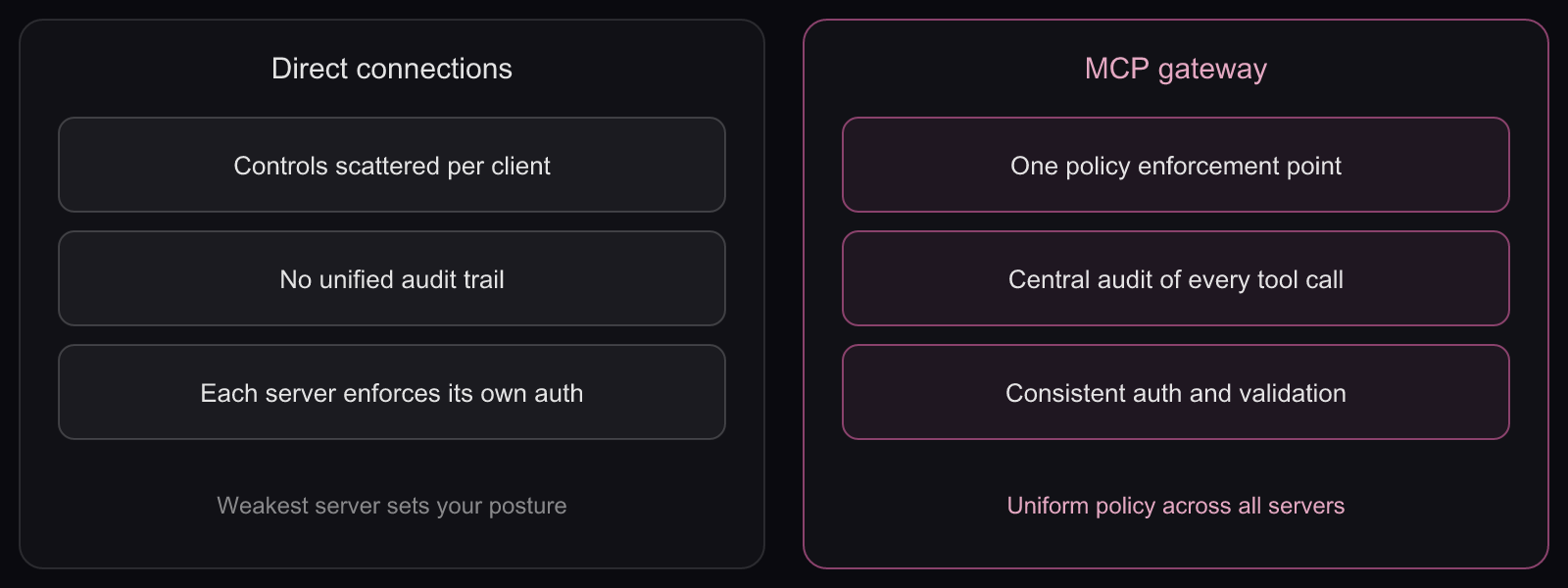
An MCP gateway solves this by sitting between agents and servers, mediating every tool call through a single policy layer:
- Centralized authentication and authorization. Every tool call is authenticated and authorized against defined policies before reaching the server. No more relying on individual server implementations to get auth right.
- Policy enforcement at the gateway layer. Tool allowlisting, scope restrictions, parameter validation, and data redaction happen at a single enforcement point, consistently applied across all agent-server interactions.
- Real-time monitoring and threat detection. Every request and response is logged with full context. Behavioral baselines detect anomalies. Alerts fire when agents deviate from established patterns.
- Supply chain protection. The gateway validates server integrity through signature verification and change monitoring. Unapproved servers are invisible to agents, not just blocked.
- Scope minimization and access control. The gateway enforces least privilege by controlling what tools each agent can discover and invoke, independent of what the underlying server exposes.
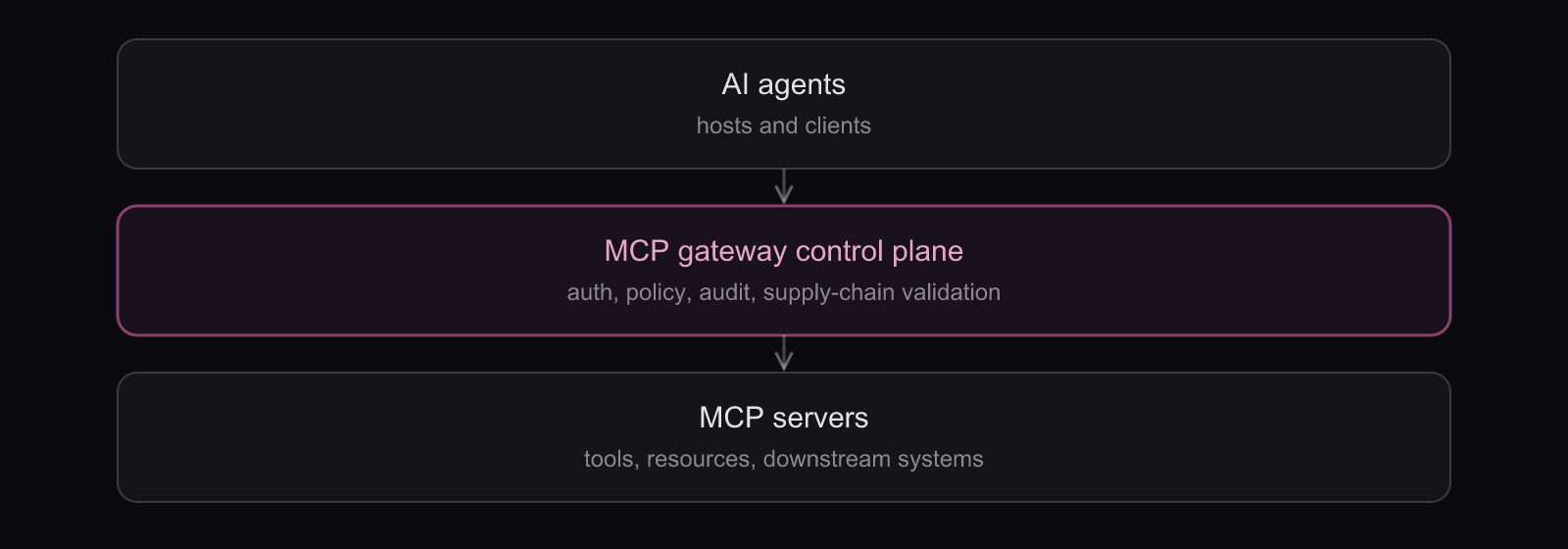
Agen provides exactly this architectural layer for enterprise teams. It sits between AI agents and the applications they access, extending your existing identity and access management into agent interactions. Whether you are securing AI agents for workforce productivity or exposing your SaaS product to customer-built agents, Agen provides identity-aware access control, data governance at the tool-call level, full observability, and anomaly detection purpose-built for agent behavior patterns. For local MCP servers running on developer workstations, Agen Shield enforces intent restrictions, skill quarantine, and egress controls at the OS level before data ever leaves the endpoint. Agen runs in your VPC, on-premises, or as a managed cloud service, keeping your tokens, keys, and audit logs within your security boundary.
MCP Security Checklist for Enterprise Teams
The best practices above set the strategy. This checklist turns them into concrete gates you can assess before, during, and after a production MCP deployment.
Pre-Deployment Assessment
- All MCP servers have been sourced from verified providers and passed security review.
- Server versions are pinned by content digest with cryptographic signature verification.
- Permission scopes have been audited against actual tool requirements (least privilege).
- Sandboxing and execution isolation are configured for all server environments.
- Network egress is restricted to approved endpoints only.
Authentication and Access Control
- OAuth 2.1 authentication is required for all remote MCP servers.
- Per-client consent flows are implemented and enforced.
- Per-tool authorization policies are defined, not just per-server.
- Short-lived, auto-rotating credentials are used instead of long-lived API keys.
- Credentials are injected at runtime from a centralized secrets manager.
Runtime Monitoring
- Every tool call is logged with user identity, agent identity, server, tool, parameters, and results.
- Logs export to your SIEM in real time.
- Behavioral baselines are established for normal agent activity.
- Anomaly detection alerts fire on deviations from baseline patterns.
- Correlation IDs enable end-to-end tracing of multi-tool call chains.
Ongoing Governance
- A formal MCP server approval workflow exists (submit, scan, review, stage, deploy).
- Tool description and behavior changes trigger automated alerts and re-review.
- Human-in-the-loop approval gates are configured for destructive or high-sensitivity actions.
- Governance controls map to your compliance frameworks (SOC 2, ISO 27001, GDPR, HIPAA).
- Executive reporting on AI agent risk posture is in place.
Incident Response
- Incident response playbooks include MCP-specific scenarios (tool poisoning, credential theft, prompt injection).
- Token revocation procedures are defined for compromised MCP servers.
- Communication templates exist for notifying affected users and downstream services.
FAQ: MCP Security Risks
What are the main MCP security risks?
The main MCP security risks are prompt injection, tool poisoning, privilege abuse, tool shadowing and shadow MCP, rug pull attacks, supply chain compromise, sensitive data and token theft, command injection, the confused deputy problem, and session hijacking with SSRF. Together they align with the OWASP MCP Top 10 taxonomy and span the full trust chain from LLM to tool.
What is prompt injection in the MCP context?
Prompt injection is when malicious instructions embedded in content an agent reads through MCP tools override the user's intent. Because LLMs cannot reliably separate trusted instructions from consumed data, a poisoned email, ticket, or document can steer the agent into executing real actions like exfiltrating data or modifying records through connected tools.
Why does traditional security fail for MCP?
Traditional security assumes a predictable caller and a clear split between instructions and data. MCP breaks both: an LLM decides which tools to call from natural language, and it treats prompts, tool descriptions, and returned data as one context stream. Firewalls, WAFs, and static perimeters cannot govern a non-deterministic caller across a dynamic attack surface.
How can an MCP gateway mitigate MCP security risks?
An MCP gateway routes every tool call through a single policy layer that authenticates requests, enforces least-privilege scopes, validates tool metadata, redacts sensitive data, and logs everything for audit. It replaces scattered per-server controls with one consistent enforcement point, which is the most effective architectural defense against the top MCP security risks.
What is the OWASP MCP Top 10?
The OWASP MCP Top 10 is a community-maintained taxonomy (MCP01 through MCP10:2025) of the most critical Model Context Protocol security risks. Its categories include token mismanagement, privilege escalation, tool poisoning, supply chain tampering, command injection, and shadow MCP servers. It gives security teams a shared vocabulary for MCP threats, as the OWASP Top 10 for LLM does for language models.
How many MCP vulnerabilities have been found?
The number is growing quickly. Academic threat-taxonomy research and public CVE trackers have catalogued dozens of MCP-related vulnerabilities through 2026, spanning command injection, SSRF, and authentication flaws, with new entries appearing regularly. The pace reflects how fast the ecosystem is expanding and how immature many community servers remain. These risks are also catalogued as a standards-aligned list in the OWASP Top 10 for MCP, organized by OWASP entry rather than by attacker objective.