MCPGuide
What Is MCP (Model Context Protocol)?
Learn what MCP is, how the Model Context Protocol works, its architecture and core primitives, the 2026 spec changes, security risks, and how to get started.

Keon ArminDigital Marketing Manager
/14 min read

Every AI assistant, agent, and copilot faces the same wall: the model can reason, but it can't see your data or touch your systems without an integration. MCP is the open standard that tears that wall down. If you're evaluating AI agents for your organization, understanding MCP is no longer optional: it's the connective tissue of the entire agent ecosystem.
What Is the Model Context Protocol?
MCP (Model Context Protocol) is an open-source standard that connects AI applications to external tools, data sources, and services through a single, common interface. Instead of building a custom integration for every AI-app-to-tool pairing, developers implement MCP once, and any compliant AI application can work with any compliant server.
The most common analogy is a USB-C port for AI. One standardized connector replaces a drawer full of proprietary cables: the AI application plugs into databases, file systems, SaaS tools, and internal services the same way every time. Anthropic open-sourced MCP in November 2024, and it has since become the industry default, adopted by OpenAI, Google, and Microsoft.
This page gives you the working understanding: what MCP does, how it works, where the risks live, and how to start. When you're ready for spec-level depth, continue to our complete guide to the Model Context Protocol.
Why Was MCP Created? The Problem It Solves
Before MCP existed, connecting an AI application to an external tool meant writing a custom integration from scratch. If you wanted Claude to access your company's database, you built a connector for that. If you also wanted it to pull data from Slack, that was a separate integration. And if you then wanted ChatGPT to do the same things, you started from zero again.
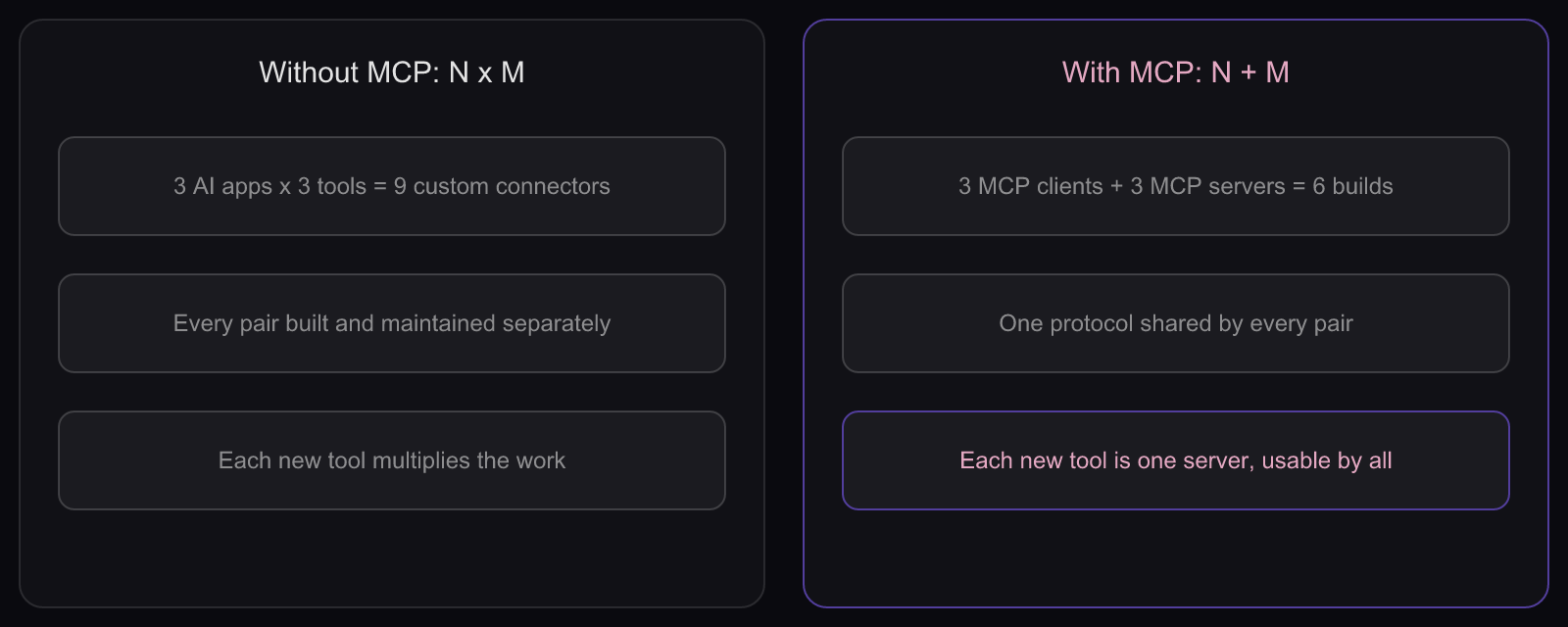
This is known as the N x M integration problem. With N AI applications and M external tools, you end up with N times M custom connectors to build and maintain. Every new tool or AI platform multiplies the complexity.
MCP eliminates this by introducing a standard protocol layer. Tool providers build one MCP server, and it works with any MCP-compatible AI application. AI application developers build one MCP client, and it can connect to any MCP server. The result: N plus M integrations instead of N times M.
For enterprises, this shift is significant. It means less engineering time spent on plumbing, faster time-to-value for AI deployments, and a common interface that security and operations teams can actually govern.
How Does MCP Work?
Standardizing the connector only matters if the conversation across it is predictable, and that is exactly what the protocol defines. MCP follows a client-server architecture built on top of JSON-RPC 2.0, a lightweight remote procedure call format. The interaction between an MCP client and server follows a structured lifecycle:
- Initialization. The client sends an initialize request. Both sides exchange their supported capabilities (which primitives they handle, which features they support) and agree on a protocol version before any data moves.
- Discovery. The client queries the server to learn what it offers, typically by listing available tools, resources, and prompts. Discovery is dynamic: the set of available tools can change over time, and the server can notify the client when it does.
- Execution. The client calls tools, reads resources, or uses prompt templates. The server processes each request and returns a structured response, with every request-response pair correlated by a unique ID.
- Notifications. Either party can send one-way messages that need no response, used for real-time updates like a changed tool list or progress on a long-running operation.

Historically, MCP treated this as one long-lived, stateful session. The 2026-07-28 specification changed that: the protocol core is now stateless, so each request carries what a server needs and can be routed to any server instance behind a load balancer. For you as a reader, the mental model stays the same four steps; the plumbing underneath simply scales better.
MCP Architecture and Core Components
Those lifecycle messages flow between three participants. Understanding them is essential for anyone building with or evaluating MCP.
MCP Hosts
The host is the AI application the end user interacts with. Claude Desktop, Visual Studio Code, ChatGPT, and Cursor are all examples of MCP hosts. The host manages one or more MCP clients and coordinates their interactions with servers.
When you open Claude Desktop and it connects to a filesystem server and a Slack server, Claude Desktop is the host managing both of those connections.
MCP Clients
Each MCP client is a component within the host that maintains a dedicated connection to a single MCP server. If the host connects to three different MCP servers, it creates three separate client instances. The client handles protocol-level communication: sending requests, receiving responses, and managing the connection lifecycle.
MCP Servers
An MCP server is a program that exposes tools, resources, and prompts to MCP clients. Servers can run locally on the same machine as the host or remotely as a shared service. The ecosystem now spans databases, cloud platforms, developer tools, CRMs, and project management systems.
Transport Layer
MCP supports two transport mechanisms that determine how clients and servers communicate:
- Stdio (standard input/output). Used for local MCP servers running on the same machine as the host. Communication happens through standard input and output streams with no network overhead.
- Streamable HTTP. Used for remote MCP servers. The client sends HTTP POST requests, and the server can stream responses back. This transport carries the OAuth 2.1 authorization model the specification defines for remote servers. (An older HTTP+SSE transport has been deprecated in its favor.)
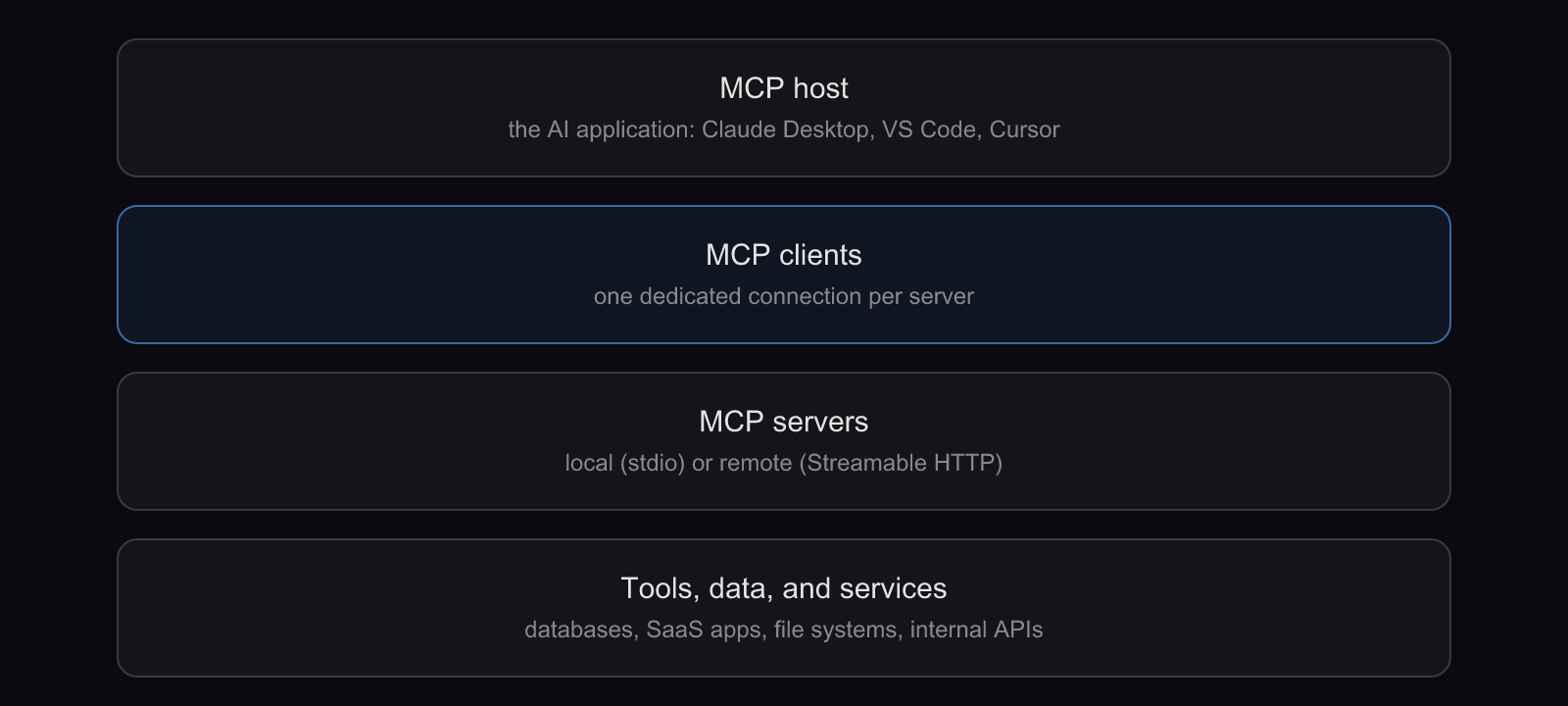
The transport layer is abstracted from the data layer, so the same JSON-RPC messages work identically whether the server is local or remote.
Key MCP Concepts
With the participants in place, the last piece of vocabulary is the primitives: the building blocks that structure what actually flows between client and server.
| Primitive | What it does | Example |
|---|---|---|
| Tools | Executable functions the AI can invoke to take an action | Run a SQL query, create a Jira ticket |
| Resources | Read-only data the AI can use as context | A file's contents, a database schema |
| Prompts | Reusable interaction templates the server provides | A guided query-builder prompt |
| Elicitation | Lets a server request structured input from the user mid-task | A confirmation form before a deletion |
| Tasks | Tracks long-running work with polling and deferred results | A multi-minute data export |
Tools
Tools are executable functions that an MCP server exposes to AI applications. When an AI agent decides it needs to take an action, like querying a database, sending a message, or creating a file, it invokes a tool. Each tool has a name, a description the model uses to decide when to call it, and an input schema defining the expected parameters. Tools are what let agents do things in the real world, not just answer questions.
Resources
Resources provide contextual data without executing an action. They are read-only sources, identified by URIs, that the model uses to inform its responses: a file's contents, a database schema, a list of CRM records. The key distinction: tools perform actions, resources provide information.
Prompts
Prompts are reusable interaction templates that servers expose to clients. A database server might provide a prompt template that explains the schema, shows example queries, and leaves a placeholder for the user's question. Prompts make tools and resources easier to use well.
Elicitation and Tasks
The 2025-11-25 specification revision added two primitives that matter for real-world workflows. Elicitation lets a server pause and ask the user for structured input, such as a confirmation or a missing parameter, instead of guessing. Tasks give long-running operations a durable identity the client can poll, so a slow export doesn't block the whole session.
You may also see sampling in older material: a primitive that let servers request LLM completions from the host. The 2026-07-28 specification deprecated it, so treat it as legacy when you evaluate server implementations.
Benefits of Using MCP
Vocabulary aside, the practical question is what MCP buys you. Four benefits come up in nearly every deployment.
Reduced Hallucinations Through Real-Time Data Access
An LLM can only work with the context it's given. When that context is incomplete or outdated, the model fills in the gaps, often incorrectly. MCP lets AI applications pull real-time data from authoritative sources at the moment it's needed, which directly reduces the risk of hallucinated answers.
Simplified Integration for Developers
MCP provides a standard interface that developers build against once, instead of a bespoke project per pairing. That lowers maintenance burden and makes it practical to connect an AI application to dozens of tools without writing dozens of connectors.
Increased AI Utility and Automation
MCP transforms AI from a system that only generates text into one that can act. With MCP tools, an agent can create tickets, update CRM records, commit code, and send messages. This is the foundation of agentic AI, where systems don't just advise but execute; if that shift is new to you, start with what agentic AI means for your organization. Platforms like Agen.co provide a secure MCP gateway so organizations can enable this automation while controlling exactly which tools agents reach.
Vendor-Agnostic and Open Source
MCP is an open protocol, not a proprietary product. It was created by Anthropic and is now backed across the industry, including by OpenAI, Google, and Microsoft. Building on MCP means you're not locked into any single AI vendor.
MCP vs. RAG: What Is the Difference?
MCP and Retrieval-Augmented Generation (RAG) are often mentioned together, but they solve different problems at different layers.
| RAG | MCP | |
|---|---|---|
| What it is | A technique for grounding responses in retrieved documents | A protocol for connecting AI apps to external systems |
| Primary job | Improve answer accuracy and relevance | Standardize data access and tool execution |
| Scope | Retrieval before generation | Retrieval, actions, prompts, live interaction |
| Relationship | Complementary: an MCP server can use RAG internally, and an app can use both |
RAG enriches an LLM's context by retrieving relevant documents from a vector database or knowledge base before generating a response. MCP is a protocol covering not just data retrieval but also tool execution, prompt management, and real-time interaction with live services. The two are complementary: an MCP server could use RAG internally and expose the results as resources, while an application uses RAG for knowledge and MCP for action.
MCP Security Considerations
Everything MCP makes possible, it also makes possible at machine speed, and that cuts both ways. When an AI agent can call tools that modify databases, access internal systems, or send messages on behalf of users, the stakes are high.
Authentication and Authorization
The MCP authorization specification pins remote servers to OAuth 2.1: the server acts as a protected resource, and a separate authorization server issues audience-bound access tokens. But authentication alone doesn't solve the governance challenge. Organizations need to control which agents can access which tools, for which users, and under what conditions.
This is where traditional access management models fall short. They weren't designed for a world where AI agents act on behalf of users, making delegated access decisions at machine speed. Solving this requires a purpose-built MCP security layer that understands agent identity, delegation, and context.
Common Security Risks
Several risks are specific to MCP deployments; our guide to MCP security risks covers the full landscape. The four to know first:
- Tool poisoning. A malicious server exposes tools whose descriptions manipulate the model's behavior, injecting instructions through metadata. See how MCP tool poisoning works in practice.
- Excessive permissions. Without fine-grained authorization, a server can grant broader access than intended.
- Data exfiltration. Agents connected to multiple servers can leak data between systems if access boundaries aren't enforced.
- Prompt injection via tool results. A compromised tool returns output containing instructions that steer the model's next actions, a variant of prompt injection.
Best Practices for Securing MCP
Security teams evaluating MCP deployments should prioritize:
- Least-privilege access. Scope tool access to the minimum permissions each agent and user requires.
- Audit logging. Log every tool call: who initiated it, what parameters were passed, what came back. Real-time observability across agent interactions is essential for catching anomalous behavior before it causes damage.
- Server verification. Only connect to MCP servers from trusted sources, and validate their behavior before granting production access.
- Centralized governance. Route agent traffic through an MCP gateway that gives security and operations teams visibility and policy enforcement across every connection.

Agen.co was built specifically to close this governance gap. It sits between AI agents and the tools they connect to, enforcing identity-aware access control, fine-grained tool authorization, data governance policies, and full audit trails across every MCP interaction.
Real-World MCP Use Cases
MCP is already powering production workflows across a range of industries and use cases:
- AI coding assistants. Tools like Claude Code and Cursor use MCP to connect to Git repositories, file systems, and CI/CD pipelines. Developers can ask their assistant to read code, create branches, run tests, and deploy changes, all through MCP.
- Enterprise chatbots. Organizations build internal chatbots that connect to CRMs, databases, and ticketing systems through MCP servers. An employee asks a question, and the agent pulls live data from Salesforce, queries Postgres, or creates a Jira ticket in one conversation.
- Workflow automation. AI agents use MCP to orchestrate multi-step workflows: read a support ticket, look up the customer in a CRM, check recent orders, and draft a response, all by calling different MCP tools in sequence.
- Data analysis. MCP lets AI applications connect to multiple data sources across an organization and run queries on behalf of users, so analysts can explore data in natural language without writing SQL.
- Design-to-code. Development teams connect AI models to design tools like Figma, letting the AI read design files and generate corresponding frontend code.
MCP Ecosystem and Adoption
Those use cases exist because the ecosystem around the protocol matured fast. What started as an Anthropic project has become an industry-wide standard.
Major platform support. Claude, ChatGPT, Gemini, Visual Studio Code, Cursor, Windsurf, and Replit all support MCP as clients, so servers built for one platform work across all of them.
An official registry. The MCP Registry, launched in September 2025, gives the ecosystem a canonical, searchable catalog of servers alongside thousands of community-built connectors. Choosing and governing which of those servers your organization trusts is its own discipline; our guide to the MCP registry covers discovery and control.
Enterprise adoption. Companies like Block, Salesforce, and Apollo have integrated MCP into their systems, and development tool companies including Zed, Replit, and Sourcegraph adopted it early.
Open governance. MCP is now governed by the Agentic AI Foundation, a directed fund under the Linux Foundation, with AWS, Anthropic, Google, Microsoft, and OpenAI among its platinum members (governance details are covered in the 2026-07-28 release announcement cited above).
How to Get Started with MCP
Adoption is only useful if you can act on it, and the on-ramp depends on your role.
If you want to use MCP tools as an end user: the fastest path is an AI application that already supports MCP, like Claude Desktop, VS Code, or Cursor. Install pre-built MCP servers and start using tools, resources, and prompts inside your existing workflow.
If you want to build an MCP server: official SDKs are available for TypeScript, Python, Java, Go, and C#, with more in progress. A basic server fits in under 100 lines: you define the tools you want to expose and implement their handlers, and the SDK handles the JSON-RPC plumbing, capability negotiation, and transport.
If you want to build an MCP client: the same SDKs support client development for teams building AI applications, managing connection lifecycle, discovery, and execution for you.
Start with the official MCP quickstart guide and the specification it links to.
How MCP Is Evolving
MCP's roadmap has moved fast enough that "the future of MCP" keeps becoming the present. Three shifts define where the protocol stands now:
A stateless, enterprise-ready core. The 2026-07-28 specification removed the persistent-session model in favor of self-describing requests, added multi round-trip requests so servers can ask users for confirmation without holding a stream open, and hardened authorization with stricter issuer validation (see the 2026-07-28 release, cited in the lifecycle section above). The practical effect: remote MCP servers now scale and load-balance like ordinary web services.
Richer primitives. The 2025-11-25 revision brought elicitation and tasks (covered above), server icons, and standardized OAuth client registration, moving MCP from a developer-tool protocol toward a full application platform (changelog cited in the concepts section above).
A place in a larger protocol stack. MCP handles how AI applications connect to tools and data. Agent2Agent (A2A), which Google contributed and which joined the same Agentic AI Foundation in August 2026, handles communication between agents themselves. The two are designed to coexist; our comparison of MCP vs A2A maps where each fits in an enterprise architecture.
As deployments scale from individual developer tools to organization-wide agent networks, centralized governance becomes the gating factor: controlling which agents reach which tools, enforcing data policies, and maintaining compliance. That is the layer Agen.co builds, providing the security and governance infrastructure for AI agents that makes enterprise-scale MCP safe.
Frequently Asked Questions About MCP
What does MCP stand for?
MCP stands for Model Context Protocol. It is an open-source standard for connecting AI applications to external tools, data sources, and services through one common interface, so a single integration works across compatible AI platforms instead of being rebuilt for each one.
Who created MCP and who maintains it now?
Anthropic created MCP and open-sourced it in November 2024. It is now governed by the Agentic AI Foundation, a directed fund under the Linux Foundation, and supported by major platforms including OpenAI, Google, and Microsoft.
Is MCP free to use?
Yes. MCP is an open-source protocol released under a permissive license. The specification, official SDKs, and reference implementations are all freely available, and there is no licensing fee to build, distribute, or run MCP clients and servers for commercial or personal use.
What is the latest version of the MCP specification?
The current specification is the 2026-07-28 release, which made the protocol core stateless, introduced multi round-trip requests, and deprecated the sampling, roots, and logging features. It follows the 2025-11-25 revision that added elicitation and tasks.
What programming languages support MCP?
Official MCP SDKs cover TypeScript, Python, Java, Go, and C#, with a Rust SDK in beta. Community SDKs extend support to additional languages such as Ruby and Swift, so most engineering teams can build MCP servers and clients in their existing stack.
How is MCP different from an API?
An API is a specific interface to one service. MCP is a protocol that standardizes how AI applications discover, connect to, and interact with many services through a common interface. MCP servers often wrap existing APIs and expose them in a form AI applications use natively.
Adopting MCP Safely: Next Steps
MCP is how modern AI applications reach your tools and data, which means adopting it well is equal parts connectivity and control. Go deeper with the complete Model Context Protocol guide, then pressure-test your security posture against the risks above. The protocol itself is now stewarded by the Agentic AI Foundation, the neutral Linux Foundation body Anthropic donated MCP to in December 2025. When you're ready to give security and platform teams one place to see and govern every agent connection, see how a governance layer for MCP works in practice.